Warnings or conflicts appear when a draft shift conflicts with your default schedule settings (i.e. your union rules). Quickly resolve conflicts with the help of our smart recommendations tool before publishing your schedule.
An exclamation mark will appear on a shift or a team member’s schedule if there are any warnings or conflicts associated with it.
Hover your mouse over the symbol to see the smart recommendation.
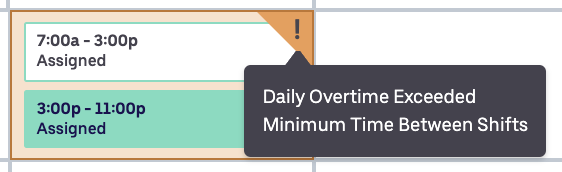
Warnings (yellow) will not block you from publishing schedules.
Warnings include:
-
- Minimum time between shifts
- Daily overtime
- Weekly overtime
Conflicts (red) will prevent schedules from being published.
Conflicts include:
-
- Overlapping shifts
Note: you can publish your schedule with warnings but you will be required to resolve any conflicts to publish your schedule.